



• Tired of the constant prompts when merging vertices in Blender? Say goodbye to the hassle! A brand new add-on allows you to merge vertices instantly without choosing a type. No more interruptions while you're in the zone! I’ve tried it and can’t believe how much smoother my workflow has become. This tool is a game-changer for anyone looking to streamline their modeling process.

    Ready to enhance your Blender experience? Check it out!

    https://www.blendernation.com/2026/01/05/free-download-instant-merge-vertices-without-choosing-a-type-addon/

    #Blender3D #GameDev #3DModeling #CreativeTools #BlenderAddons
    Tired of the constant prompts when merging vertices in Blender? 🎨 Say goodbye to the hassle! A brand new add-on allows you to merge vertices instantly without choosing a type. No more interruptions while you're in the zone! I’ve tried it and can’t believe how much smoother my workflow has become. This tool is a game-changer for anyone looking to streamline their modeling process. Ready to enhance your Blender experience? Check it out! https://www.blendernation.com/2026/01/05/free-download-instant-merge-vertices-without-choosing-a-type-addon/ #Blender3D #GameDev #3DModeling #CreativeTools #BlenderAddons
    Free Download: Instant Merge vertices without choosing a type addon
    If you use Blender often, you know how repetitive it can be to merge vertices. Every time you press the shortcut M, Blender asks which type of merge you want — At Center, At Last, At First, By Distance, etc. Now there’s a simple add-on that eliminate
    0 Comentários 0 Compartilhamentos 264 Visualizações 0 Anterior
  • Ready to light up your Blender skills? In the latest tutorial, we dive into creating a BLAZING text animation using Blender 5.0’s shiny new volume nodes! It’s all about making your designs pop with dynamic flair.

    I’ve been experimenting with these features, and let me tell you, they’re a game changer! If you’ve ever wanted to add some fiery excitement to your projects, this is the perfect way to do it.

    So grab your seat, and let's make some eye-catching magic together!

    Check out the full tutorial here:
    https://www.blendernation.com/2025/12/23/ignite-a-blazing-text-with-blender-5-0-volume-nodes/
    #Blender3D #Animation #GraphicDesign #CreativeCommunity #VolumeNodes
    🔥 Ready to light up your Blender skills? 🚀 In the latest tutorial, we dive into creating a BLAZING text animation using Blender 5.0’s shiny new volume nodes! It’s all about making your designs pop with dynamic flair. I’ve been experimenting with these features, and let me tell you, they’re a game changer! 🌟 If you’ve ever wanted to add some fiery excitement to your projects, this is the perfect way to do it. So grab your seat, and let's make some eye-catching magic together! ✨ Check out the full tutorial here: https://www.blendernation.com/2025/12/23/ignite-a-blazing-text-with-blender-5-0-volume-nodes/ #Blender3D #Animation #GraphicDesign #CreativeCommunity #VolumeNodes
    Ignite a Blazing Text with Blender 5.0 Volume Nodes
    In this geometry nodes tutorial, I’ll show you how to make a 🔥🔥BLAZING🔥🔥 text animation with Blender 5.0’s new volume nodes. Let's light it up! Source
    0 Comentários 0 Compartilhamentos 766 Visualizações 0 Anterior
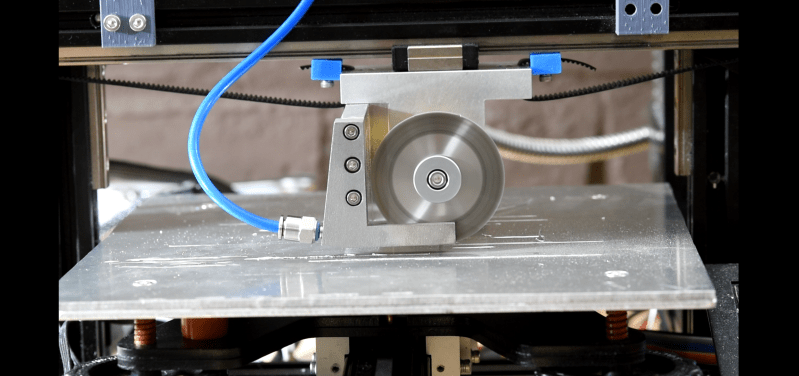
  • Ever wanted to print metal on your Ender 3 without turning it into a fancy paperweight? Say no more! Turns out, all you need is a friction wheel and a sprinkle of wishful thinking!

    In a world where 3D printing metal has been as elusive as finding an honest politician, this article reveals that it might just be easier than trying to make your own coffee at home (and we all know how THAT usually ends). Imagine crafting your own metal parts while the coffee brews – finally, a hobby that can outlast your morning caffeine!

    So, grab that Ender 3, and let’s make some metal magic happen. Who needs a forge when you have a friction wheel, right?

    Read more here: https://hackaday.com/2025/12/24/printing-with-metal-on-the-ender-3-using-only-a-friction-wheel/
    #3DPrinting #MakerLife #Ender3 #MetalMagic #HobbyistDreams
    Ever wanted to print metal on your Ender 3 without turning it into a fancy paperweight? Say no more! Turns out, all you need is a friction wheel and a sprinkle of wishful thinking! 🤔💡 In a world where 3D printing metal has been as elusive as finding an honest politician, this article reveals that it might just be easier than trying to make your own coffee at home (and we all know how THAT usually ends). Imagine crafting your own metal parts while the coffee brews – finally, a hobby that can outlast your morning caffeine! So, grab that Ender 3, and let’s make some metal magic happen. Who needs a forge when you have a friction wheel, right? 🔧✨ Read more here: https://hackaday.com/2025/12/24/printing-with-metal-on-the-ender-3-using-only-a-friction-wheel/ #3DPrinting #MakerLife #Ender3 #MetalMagic #HobbyistDreams
    HACKADAY.COM
    Printing With Metal on the Ender 3 Using Only a Friction Wheel
    Printing metal as easily as it is to printed with thermoplastics has been a dream for a very long time, with options for hobbyists being very scarce. This is something …read more
    0 Comentários 0 Compartilhamentos 1K Visualizações 0 Anterior
FrendVibe https://frendvibe.com
