


Five Critical Security Hardening Steps for CyberPanel on an Unmanaged Linux VPS
CyberPanel makes Linux VPS hosting easier by providing a graphical interface for managing websites, databases, email accounts, SSL certificates, and server settings. It works with OpenLiteSpeed and gives website owners a convenient way to manage their hosting environment without handling every task through Linux commands.
But installing CyberPanel doesn't automatically make a VPS secure. A newly configured server may still expose administrative ports, accept unnecessary network connections, or rely on passwords that attackers can attempt to guess. These weaknesses are especially important on an unmanaged VPS, where the server owner is responsible for security updates, access controls, firewall policies, and system monitoring.
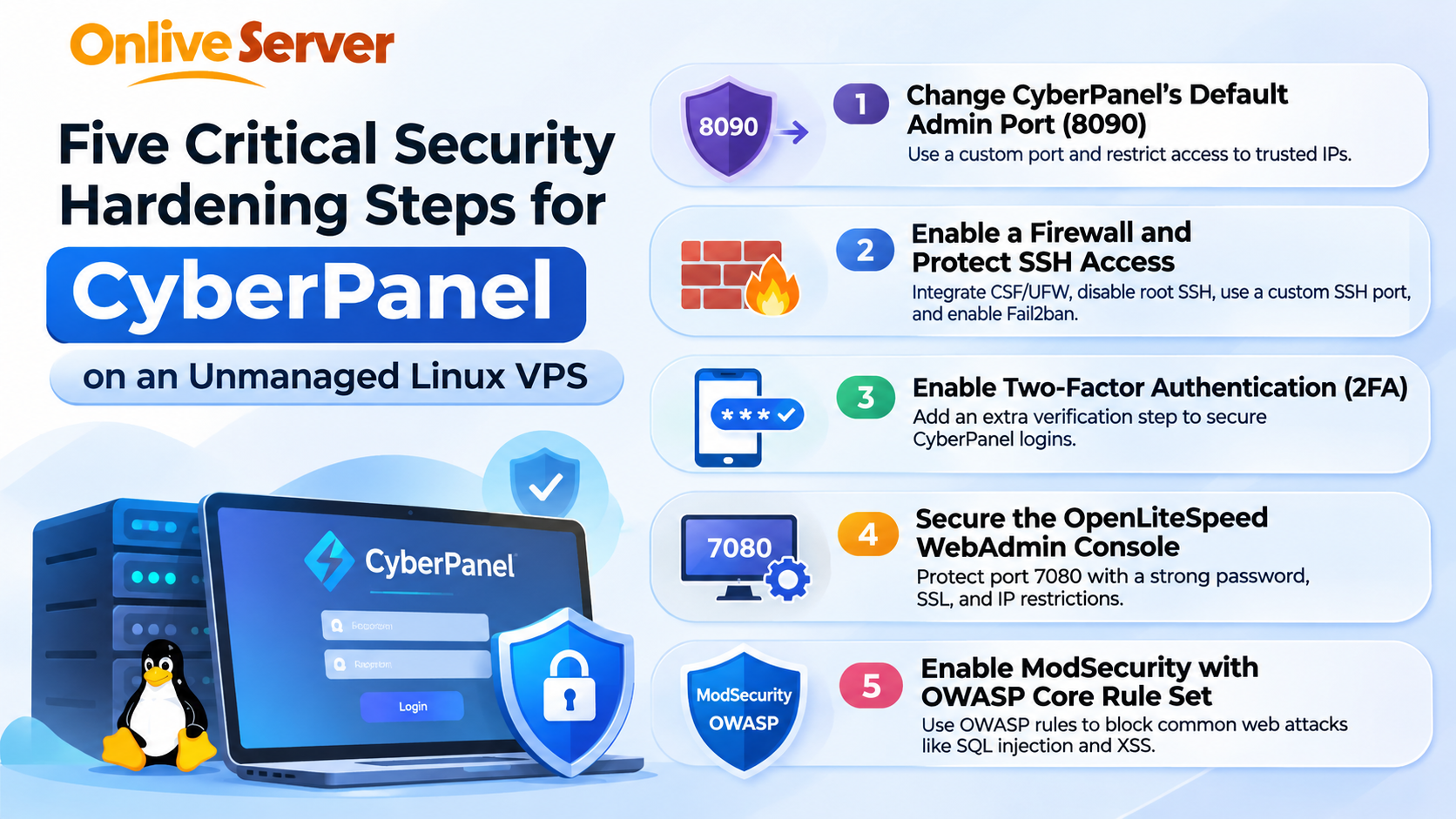
CyberPanel security hardening involves protecting administrative access, restricting network traffic, enabling stronger authentication, securing OpenLiteSpeed management tools, and filtering suspicious website requests.
The following five security measures should be reviewed before hosting production websites or sensitive customer information.
Secure CyberPanel's Default Administrative Port 8090
CyberPanel commonly uses port 8090 for its administrative dashboard. This interface allows authorized users to manage websites, databases, DNS settings, backups, and other hosting functions.
Because the port is widely associated with CyberPanel, automated scanning tools may check public servers for exposed management interfaces. An accessible login page can attract password-guessing attempts and other unwanted traffic.
Changing the default administrative port can reduce some routine scanning noise, but it should never be treated as a complete security solution. Attackers can discover services running on alternative ports.
A stronger approach is to restrict dashboard access to trusted IP addresses through a firewall or secure VPN. This prevents unnecessary public access even when someone discovers the management port.
Before modifying port settings, administrators should verify that the new port is permitted by the server firewall and the VPS provider's network security rules. Otherwise, the CyberPanel dashboard may become inaccessible.
It is also important to confirm that the dashboard uses a valid SSL certificate. Encrypted administrative connections help protect login credentials and session information while users manage their servers.
Website owners following a CyberPanel installation and configuration guide should include administrative access restrictions as part of their initial deployment process.
Enable a Firewall and Protect SSH Access
A firewall controls which network connections can reach a Linux VPS. Without appropriate firewall rules, services that do not need public access may become available to internet users.
CyberPanel provides firewall management capabilities, and some installations support ConfigServer Security & Firewall (CSF). Linux distributions may also use UFW, firewalld, or other firewall management systems.
The appropriate firewall depends on the operating system, installed packages, and current compatibility. Administrators should avoid running conflicting firewall management systems without understanding how their rules interact.
For a typical website hosting environment, public access is generally needed for HTTP and HTTPS traffic. Other services, including SSH, databases, email, DNS, and administrative interfaces, should be exposed only when required.
SSH deserves special attention because it provides direct access to the server's operating system.
Disabling direct root SSH login reduces the risk of unrestricted administrative access through a single account. Administrators can instead use an individual account with controlled privileges and SSH key authentication.
Changing the default SSH port may reduce routine automated login attempts, although it does not replace proper authentication or access restrictions.
Fail2ban can provide another layer of protection by monitoring supported authentication logs and temporarily blocking addresses associated with repeated failed login attempts.
Firewall changes must be planned carefully. Blocking SSH or administrative access before confirming an alternative connection method can lock the server owner out of the VPS.
For businesses using Linux VPS hosting infrastructure, firewall configuration is an essential part of maintaining control over publicly accessible hosting services.
Enable Two-Factor Authentication for CyberPanel Accounts
Passwords are an important part of CyberPanel security, but passwords alone cannot provide sufficient protection against every account attack.
Login credentials may be exposed through phishing attempts, reused passwords, compromised devices, or insecure password storage. If an attacker obtains a valid CyberPanel password, they may be able to access critical hosting functions.
Two-factor authentication adds an additional verification requirement during the login process.
CyberPanel supports authenticator-based two-factor authentication. Administrators can enable it through the user management settings on supported versions. After activation, logging in requires the normal account credentials and a temporary verification code from an authenticator application.
Knowledge Base
This extra verification step makes unauthorized access more difficult when a password has been exposed.
Two-factor authentication should be enabled for administrator accounts and other users who can modify important server settings.
Each administrator should use a separate account rather than sharing one set of login credentials. Individual accounts make it easier to manage permissions and investigate suspicious activity.
Strong passwords, appropriate access privileges, and secure recovery procedures remain necessary even after enabling two-factor authentication.
Administrators should also check how account recovery works and ensure that authentication recovery information is stored securely. Losing access to the authentication application without an approved recovery method can create operational problems.
For web development agencies managing several client websites, individual accounts and stronger authentication help reduce the risk of one compromised login affecting multiple projects.
Secure the OpenLiteSpeed WebAdmin Console on Port 7080
CyberPanel uses OpenLiteSpeed as its web server, and OpenLiteSpeed has a separate WebAdmin Console for managing server-level settings.
This console commonly uses port 7080 and provides access to important web server configurations.
Although CyberPanel and OpenLiteSpeed work together, their administrative interfaces serve different purposes. Securing the CyberPanel dashboard does not automatically guarantee that the OpenLiteSpeed WebAdmin Console is protected.
If port 7080 is publicly accessible, unauthorized users may attempt to reach its login page.
The safest general practice is to restrict WebAdmin access to authorized administrators through trusted IP addresses or a private management connection.
Administrators should also ensure that the OpenLiteSpeed WebAdmin account uses a strong, unique password. Default or previously shared credentials should never remain in use on a production server.
Where possible, administrative connections should use HTTPS with a trusted certificate.
Another useful precaution is to disable unnecessary public access to the WebAdmin interface when administrators do not need to manage it remotely.
Server owners should periodically review whether WebAdmin access is still required and confirm that firewall restrictions remain effective after configuration changes.
This is particularly important for unmanaged VPS environments where several websites share the same web server installation.
A compromised WebAdmin account can expose configuration controls beyond those available to an individual website user. Protecting this interface therefore deserves the same attention as securing CyberPanel itself.
Enable ModSecurity with OWASP Core Rule Set Protection
Securing administrative access is only one part of protecting a hosting environment. Public websites also receive requests that may contain malicious input or attempts to exploit application weaknesses.
ModSecurity is a web application firewall technology that examines HTTP requests and applies security rules to identify suspicious activity.
OpenLiteSpeed supports ModSecurity-compatible protection, including suitable versions of the OWASP Core Rule Set.
OpenLiteSpeed Documentation
The OWASP Core Rule Set provides general detection rules for common web application attacks, including SQL injection, cross-site scripting, and certain file inclusion attempts.
OWASP Foundation
For websites running WordPress, WooCommerce, or other PHP applications, a properly configured web application firewall can help reduce exposure to some automated attacks.
CyberPanel includes options for managing ModSecurity, although available rule sets and configuration methods can vary depending on the installation.
Administrators should select a compatible, actively maintained rule set and verify that it is working correctly.
Simply enabling security rules without reviewing their behavior can cause problems. Some legitimate requests may resemble suspicious activity and trigger false positives.
For example, a security rule might interfere with a WordPress administrative function, a contact form, or an eCommerce checkout process.
Testing important website functions after enabling ModSecurity helps identify these problems before they affect customers.
Security logs should be reviewed regularly, and rule exceptions should be limited to verified legitimate requests rather than disabling broad categories of protection.
ModSecurity is a useful defensive layer, but it cannot replace application updates, secure coding, strong authentication, or server-level security maintenance.
Additional Security Practices for an Unmanaged CyberPanel VPS
The five measures above address important areas of server protection, but CyberPanel security also depends on regular maintenance.
Keeping CyberPanel, OpenLiteSpeed, PHP, Linux packages, and installed website applications updated is especially important.
CyberPanel has previously received security patches for serious vulnerabilities, including vulnerabilities that could allow remote command execution on affected versions. This demonstrates why updates should be treated as a core security requirement rather than an optional maintenance task.
ASEC+1
Before applying major updates, administrators should maintain reliable backups and, when available, test significant configuration changes in a staging environment.
Backup files should be stored separately from the production VPS whenever practical. If attackers compromise a server, backups stored only on that same server may also become inaccessible or damaged.
An effective backup strategy should include regular recovery testing. A backup that has never been tested may fail when it is needed most.
Server monitoring is equally important. Administrators should review authentication failures, unusual network activity, unexplained resource consumption, and unexpected changes to website files.
For organizations handling customer information, security procedures should also cover employee account access, data retention, secure file transfers, and incident response responsibilities.
Businesses operating in the Philippines should assess applicable requirements under the Data Privacy Act of 2012 and relevant National Privacy Commission guidance. CyberPanel security settings can support technical safeguards, but they do not independently establish legal compliance.
Common CyberPanel Security Mistakes to Avoid
One frequent mistake is assuming that changing a default port makes an administrative interface safe. Although an alternative port may reduce routine scanning attempts, it does not protect against discovered services or vulnerabilities in outdated software.
Another problem is opening unnecessary network ports to troubleshoot connection errors and then leaving them publicly accessible.
Administrators sometimes disable security protections when they interfere with website functionality. This can solve an immediate problem while creating a larger security risk.
A better approach is to investigate the specific restriction, confirm that the affected request is legitimate, and apply the narrowest appropriate adjustment.
Using the same password across hosting dashboards, SSH accounts, and application administration is another avoidable risk.
Finally, server owners should not assume that a successful CyberPanel installation means every component is configured securely. Administrative permissions, SSL certificates, firewall policies, backup schedules, and website applications all require separate verification.
Conclusion
Securing CyberPanel on an unmanaged Linux VPS starts with controlling who can access the server and which services are exposed to the internet. Restricting port 8090, configuring a suitable firewall, enabling two-factor authentication, protecting OpenLiteSpeed WebAdmin on port 7080, and using ModSecurity with OWASP rules provide a practical foundation.
These protections work best alongside timely software updates, secure SSH access, independent backups, and regular monitoring. Changing ports or enabling a firewall alone cannot prevent every attack.
For businesses, developers, and hosting administrators managing customer websites, consistent security maintenance is essential to keeping a CyberPanel VPS reliable and reducing avoidable risks.

 English
 Arabic
 French
 Spanish
 Portuguese
 Deutsch
 Turkish
 Dutch
 Italiano
 Russian
 Romaian
 Portuguese (Brazil)